TurboViewer download for android 11 (Red Velvet Cake)
APK file TurboViewer compatible with Android 11How to install APK / APKS / OBB file on Android
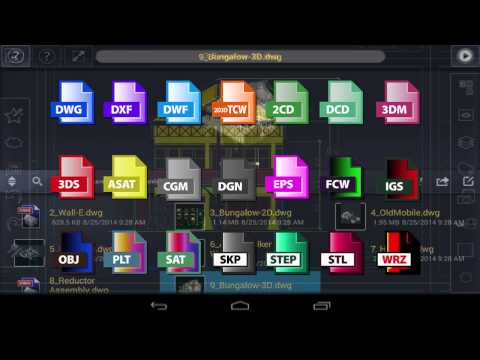

THE FASTEST, EASIEST WAY TO VIEW, MARKUP, AND SHARE 2D/3D DRAWINGS AND DOCUMENTS
The TurboViewer family of lightning-fast view, markup, and sharing apps are powerful and innovative... the first mobile DWG™ viewer and markup that support both 2D and 3D.
Built from the ground up -- and specifically optimized for smart devices -- TurboViewer sets the standard for mobile AEC viewing and markup.
__________________________________________________
There are three TurboViewer apps:
• TurboViewer (FREE)
• TurboViewer X ($6.99)
• TurboViewer Pro (Limited time special $19.99)
__________________________________________________
Highlights include [differences designated below]:
MARKUP FEATURES:
• AutoShapes: Drawing rough shapes with your finger automatically refines to accurate geometry
• Redmark tools: Markup 2D and 3D objects using line, circle, rectangle, revision cloud, text, rectangular text box and leader
SHARING FEATURES:
• Contact Management built on top of native Contacts (so all current contact info is available)
• Organize contacts into Groups for easy "one tap" sending of shared drawings or documents to large design and construction teams
VIEWING FEATURES:
• Lightning-fast 2D and 3D environment
• Smooth multi-touch navigation; Pan, zoom, and 3D orbit effortlessly around document
• Hidden line, shaded, and wireframe viewing
• Isometric view
• AutoCAD® SHX font support - Localized or custom SHX fonts
• TrueType font support - Improved visual fidelity with native TTF font file support
• Option to use default or model lights (if any in drawing)
• Option to render both inside and outside model (force two-sided rendering)
• Supports AutoCAD linetypes - Maintain visual fidelity as intended
• [Pro] Realistic (materials), x-ray, gray scale, and shaded without outline
• [Pro] Adjust edge color range from white-gray-black
• [Pro] Adjust x-ray transparency factor
• [Pro] Custom perspective view - View 3D models in realistic perspective angles (human eye perspective or specify custom camera lens sizes in mm)
• [X and Pro] Layer Manager - Layer view manager to turn layers on/off, invert layers
• [X and Pro] Layout support - View model space and paper space layouts
FILE MANAGEMENT:
• Create sub-folders
• Cut/Copy/Paste/Rename files and folders
• Search files and folders by name, size, and date
• Sort by name, size, and date (ascending or descending)
• Send files to other apps using copy, AirDrop, Message, and Mail
• Diagnostic for missing xref and fonts
CUSTOMIZED USAGE:
• Restore saved AutoCAD views - Quickly display the best vision of your design
• Tactile sound feedback - Sound confirmation for button and UI item selection
• Autosense for 2D or 3D drawings - Option to automatically set appropriate gesture navigation of a drawing or model
• Option to use two fingers to 3D rotate/tumble or constrain orbit
• Unique time-savers - Able to navigate full-screen preview during file load; Cancel errant file load
• [Pro and X] Banner free
FORMATS, LOCALIZATION, AND SUPPORT:
• 2D and 3D CAD Drawing support (AutoCAD® and AutoCAD LT®, TurboCAD, and DoubleCAD), DXF, TCW, DCD, and 2CD)
• Cloud conversion server
• Import/Export support for mail, Web downloads, Dropbox, Box, etc.
• Online wiki help system
• Forum support
• [Pro] Other popular AEC file formats translated in the cloud including 2CD, 3DM, 3DS, ASAT, CGM, DCD, DGN, EPS, FCW, IGS, OBJ, PLT, SAT, SKP, STEP, STL, STP, TCW, and WRZ
• [Pro] 12-month premium telephone support
• [Pro] 12-month premium email support
Note: Trouble with TurboViewer? Please visit our support forum or contact us directly, problems may be easily resolved by our support team!
__________________________________________________
• Additional Android 8.0 device compatibility updates
• Miscellaneous optimizations, stability, and bug fixing
- LicenseFree
- File nameTurboViewer
- File Version4.2
- Package namecom.imsi.TurboViewer.Free
- Size46.12 MB
- UploadedApril 13, 2018
- Android4.2 or later
- CategoryProductivity
- DeveloperIMSI/Design, LLC
- Developer site
- Developer emailTurboApps@imsidesign.com
- md5 hashbe1fa3a5989f4b3362085aa7f2231896
- Architecturearmeabi-v7a
- Permissionsshow (12)